
Business guide
Why isn't my website showing up on Google?
A website that is set up properly shows up on Google within days. Here is a two-minute test to see whether Google has yours, the usual causes if it doesn't, and what a real launch looked like.
How long should it take?
A website that is set up properly usually shows up on Google within days of going live. The one in the example further down took one day. Google's own guidance says it can take from a few days to a few weeks. So if yours has been live for a month or more and you still can't find it, waiting longer is unlikely to fix it. Something is in the way, and it is usually one of a handful of things you can check yourself.
There are two different problems hiding in that one complaint, and they have different fixes. Either Google does not have your website at all, or Google has it and shows it too far down for anyone to see. The two-minute test below tells you which.
The two-minute test
Open Google and type site: followed by your web address, with no space, like site:yourbusiness.com.au. This asks Google to list the pages it holds from your website. It is a rough check, not an exact count, but it is enough to tell the two problems apart.
Then search for your exact business name. A business that Google has should come up for its own name, unless the name is a common phrase or a bigger business shares it.
- Nothing comes back
Google does not have your site. Work through the causes below, starting with cause one.
- Only one or two pages come back
Google found the front door but not the rest. This is usually a missing sitemap, or pages that nothing links to.
- Your pages come back, but customers can't find you
Google has the site. The problem is where it ranks, which is a different job.
Google's free Search Console gives the exact answer for any single page.
Cause one: the site is telling Google to stay away
If the test came back empty, check this first. It takes a minute and it blocks everything else.
Website builders and developers switch on a "discourage search engines" or "noindex" setting while a site is being built, so the half-finished version stays out of Google. It is easy to forget to switch it off at launch. In WordPress it is a tick box under Settings, then Reading. While it is on, Google's crawler turns up, reads the instruction and leaves without taking a single page.
If your site was built in code rather than in a builder, on Next.js for example, there is no tick box to look for. The same instruction lives in one of three places: the robots file, a "noindex" line in a page's settings, or a hidden header the server sends with each page. Preview and staging copies of a site are usually blocked this way on purpose, so the problem tends to appear when the block is carried over to the live site. Ask your developer to check all three.

Cause two: nobody told Google the site exists
Google finds a new site by following links to it from other sites, or by being handed a list of its pages. That list is called a sitemap, and it is the website's own instructions to the crawler: here is every page I have, come and read them.
You hand it over through Search Console, Google's free tool for site owners. A new site with no links pointing to it and no sitemap can sit unnoticed for weeks.

Other causes worth ruling out
If the setting is off and the sitemap is in, these are the next things to look at.
- The pages can't be reached. Every page that matters should be a click or two from the home page through ordinary links. A page you can only reach through a search box or a form may never be found.
- There is not much on the page to read. A home page that is one big photo, a logo and a phone number gives Google nothing to match to a search.
- The site moved to a new address and the old address was not redirected to the new one.

What normal looks like: a real launch
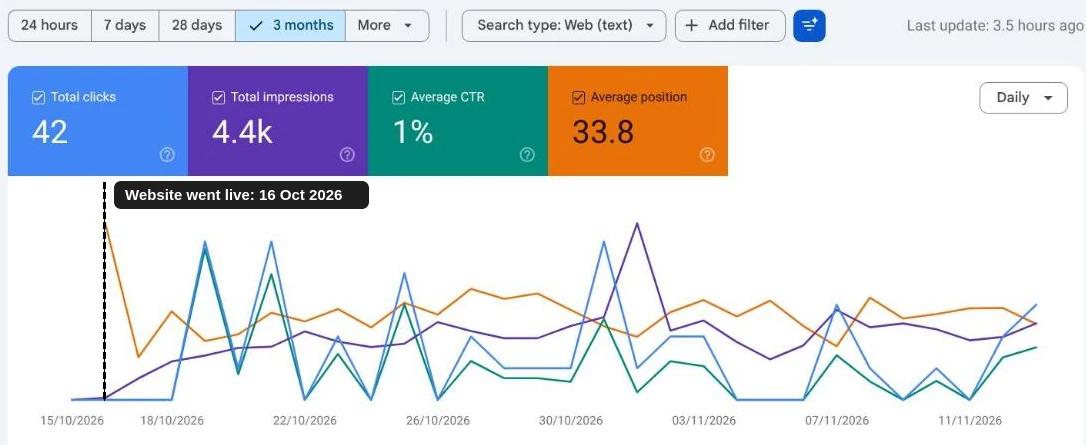
Here is a yardstick. On 16 October 2026 I put a brand-new website live for a Melbourne trade service company. It had a new domain name and no links from any other website.
Google's crawler made its first visit 32 seconds after the site went live, and I gave Google the sitemap within the first few minutes. The next day Google had read 41 pages and the site was appearing in searches. Three days in, it had its first visitors from Google.
None of that was a trick. The sitemap went to Google straight away, every page was a click or two from the home page, the pages loaded fast, and each one had real written content about a specific job the business does.
Showing up is not the same as being found
That same site is also the honest picture of what comes next. In its first four weeks it appeared in searches about 4,400 times and brought 42 visitors. Its top spots were for specialist work that few other businesses write about. For the broad, competitive searches in its trade it was still several pages down.
So if the test shows Google has your site but customers still can't find you, nothing is broken. Getting onto Google takes days. Ranking for the searches your customers actually type takes pages written about those jobs, a complete Google Business Profile, reviews and time.
What to do next
If Google doesn't have your site, check the "discourage search engines" setting first. Then set up Google Search Console, which is free, submit your sitemap, and use its URL Inspection tool on your home page. It tells you in plain words whether the page is on Google and, if it isn't, why.
If whoever built the site still looks after it, send them your test result and ask which of the causes above applies. It is a fair question, and it should not take them long to answer.
Sources and further reading
Not sure which one it is?
Send me your web address. I'll run the checks in this guide on your site and tell you which cause it is and what the fix involves. It's free, and I reply by email.